


Turn application behavior into
reliable, repeatable tests
SolidX TestHub helps enterprises that find it hard to create and maintain automation tests for production applications. Use AI to author scenarios faster, then run structured UI or API workflows with reusable test data and explicit assertions.
Run tests locally while developing or use the same CLI-driven workflow in CI. TestHub handles controlled setup and teardown so every run starts from a dependable state.
SolidX and non-SolidX apps. TestHub supports testing for SolidX-based applications and any other web application. Register the app in the TestHub portal and run structured UI or API scenarios against it.
Built on SolidX Core testing. TestHub is based on the core testing framework available in SolidX Core. Capabilities and technical details are in the SolidX testing documentation.
Enterprise test automation should not be hard to start or hard to keep running
Many enterprises struggle to create automation tests quickly and deploy them in a reliable, enterprise-ready way. Coverage stays thin because authoring is slow, expertise is scarce, and keeping suites aligned with production applications takes continuous effort.
TestHub helps teams create, run, and maintain automated quality with AI:
- ✓Author automation scenarios with AI assistance, then refine them as structured definitions.
- ✓Define UI or API scenarios as reusable, inspectable test cases.
- ✓Reuse fixtures, identities, parameters, and saved values.
- ✓Make expected behavior explicit through assertions.
- ✓Run selected scenarios by application, ID, or tag.
- ✓Apply consistent timeouts and retries.
- ✓Configure and execute test cases and runs from the TestHub portal or via CLI.
The outcome is a test workflow that is easier to start, understand, repeat, and operate across development and delivery pipelines.
From registered applications to inspectable run evidence
TestHub gives teams a clear operating surface for applications, run history, and scenario-level results, including artifacts when a run fails.
All projects configured for testing
Register applications, filter by tags, and see last-run status at a glance across your TestHub workspace.

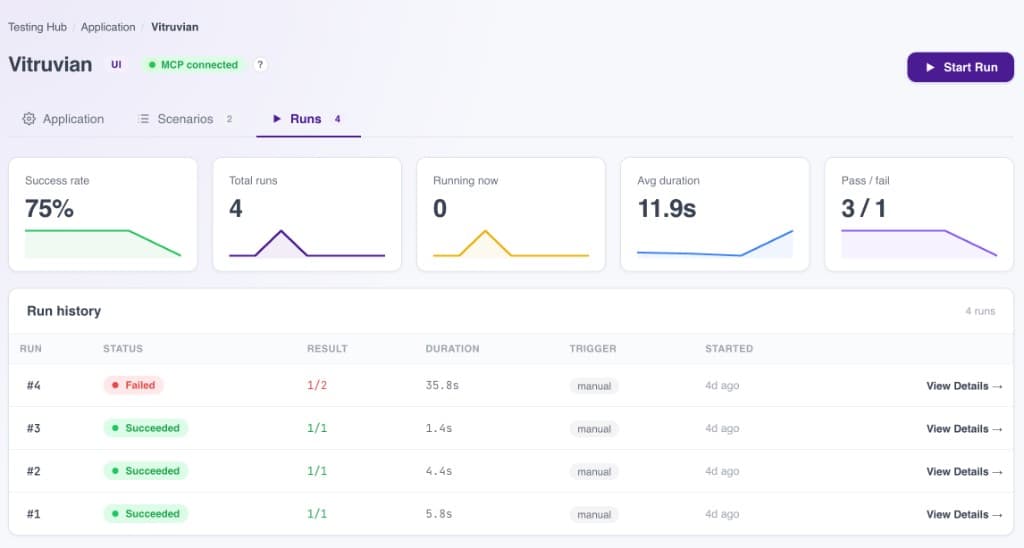
Runs and live stats per application
Track success rate, duration, pass and fail counts, and every historical run for a specific application.
Clear outcomes when suites pass, rich evidence when they fail
Successful runs show scenario-level results and suite health. Failed runs capture video, API logs, browser control logs, and other artifacts so teams can diagnose quickly.
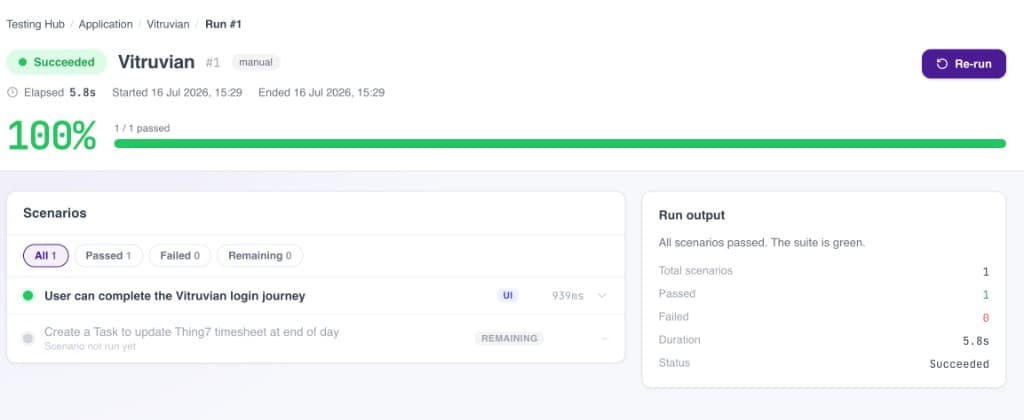
Scenario filters, pass rate, and run output make a successful execution easy to confirm and re-run.
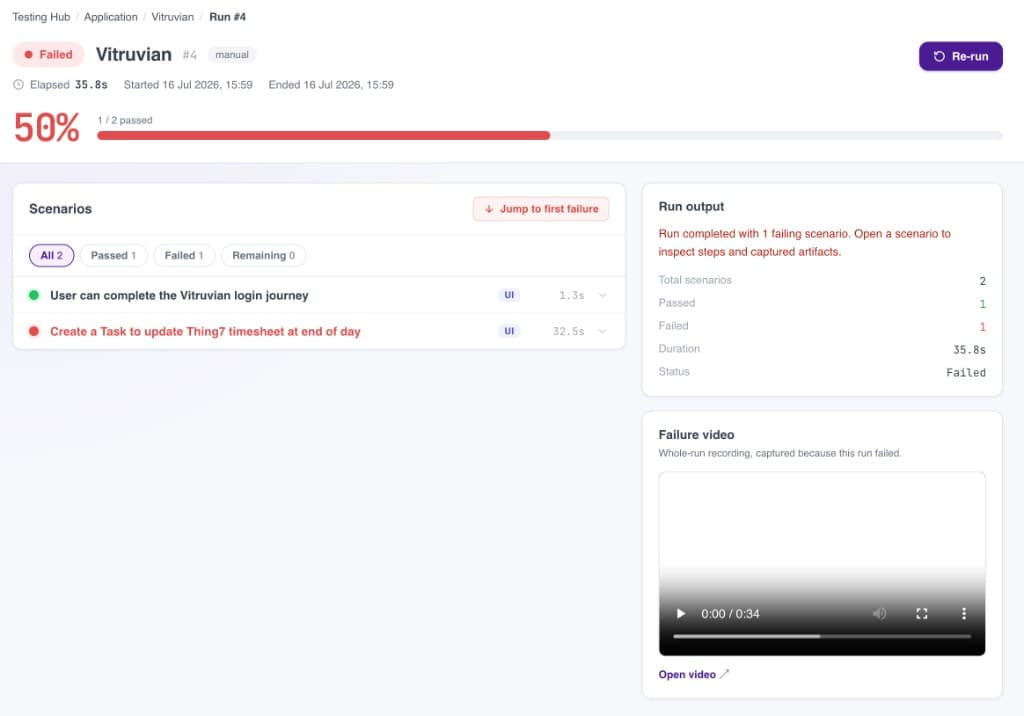
Jump to the first failure, inspect scenario steps, and review captured video plus API and browser control logs.
One foundation, two focused workflow types
TestHub supports UI testing and API testing as separate workflow types. Teams can choose the workflow that matches the behavior they need to validate without combining browser and API steps in the same scenario.
Playwright-based browser execution
Validate critical user journeys in a real browser.
- ✓Navigate between pages.
- ✓Complete forms and enter text.
- ✓Select values and press keys.
- ✓Click controls and links.
- ✓Verify visible content.
- ✓Assert page URLs and routing behavior.
- ✓Run in headed mode for local debugging.
- ✓Run headlessly for automated execution.
Structured HTTP validation
Validate service behavior through structured HTTP requests and response assertions.
- ✓Exercise GET, POST, PUT, PATCH, and DELETE operations.
- ✓Send JSON, text, query parameters, and multipart uploads.
- ✓Apply configured authentication.
- ✓Validate response status and payload content.
- ✓Assert equality, containment, regex matches, and JSON-path values.
- ✓Reuse values returned by earlier steps within the API scenario.
- ✓Enable full request and response logging when deeper debugging is needed.
Author tests as structured, reusable scenarios
TestHub scenarios are structured definitions rather than scattered scripts. Teams can author with AI assistance in the portal, then keep each scenario as a stable identity with an explicit sequence of steps so intent and expected behavior stay easy to inspect.
- ✓Stable scenario IDs and descriptive names.
- ✓Parameters for reusable execution.
- ✓Tags for organization and selection.
- ✓Configurable timeouts and retries.
- ✓Structured setup and execution steps.
- ✓Reusable fixtures and test identities.
- ✓Runtime interpolation from environment values, parameters, fixtures, and saved resources.
- ✓BDD-style phases or flat operation sequences.
This structured approach helps teams establish consistent test conventions for SolidX applications and other web applications alike.
Configure in the portal. Run locally or in CI.
Test cases and test runs can be fully configured in the TestHub portal. For teams that prefer command-driven workflows, solidctl provides the same structured execution model for local development and CI.
- ✓Configure applications, scenarios, and runs fully in the TestHub portal.
- ✓Author and manage test cases without requiring CLI-first workflows.
- ✓Optionally execute through solidctl for local development and CI pipelines.
- ✓Select scenarios by ID or tag, skip specified scenarios, and configure retries and timeouts.
- ✓Use headed or headless browser execution for UI workflows.
- ✓Keep the same structured scenario model across portal and CLI execution.
Suitable for CI without requiring a separate test-authoring model for automated execution.
Going further with AI, code context, and release confidence
In addition to structured UI and API automation, we are expanding TestHub so enterprises can connect their codebase, discover scenarios faster, assess security posture, and understand coverage.
Git repository access
Connect your codebase through a Git repository so TestHub can work directly with the application under test.
Security and vulnerability checks
Run core security and vulnerability assessment checks as part of the TestHub quality workflow.
Automatic scenario discovery
Discover candidate test scenarios from the codebase so teams spend less time inventing coverage from scratch.
Code coverage stats
Surface coverage insights so teams can see what is exercised and where gaps remain.
Built for confidence at every release
Structured instead of script-heavy
Define scenarios, data, and assertions through a consistent model rather than isolated automation scripts.
Works with any web application
Test SolidX-based applications and non-SolidX web applications from the same TestHub portal.
Focused UI and API validation
Validate browser journeys with Playwright or service behavior through HTTP workflows, using the right scenario type for each test.
Reusable test context
Share fixtures, identities, parameters, environment values, and saved resources across the steps that need them.
Portal-first, CI-ready
Configure test cases and runs in the TestHub portal, then execute locally or in CI through solidctl when needed.
Explicit, inspectable outcomes
See scenario and step results in the portal and console, with video, API logs, and browser control logs when runs fail.
Core capabilities at a glance
| Capability | What TestHub provides |
|---|---|
| UI automation | Playwright-based browser workflows for navigation, input, interaction, and visible-state assertions |
| API automation | Structured HTTP requests, authentication, payload handling, uploads, and response assertions |
| Scenario authoring | Structured scenarios with IDs, parameters, tags, steps, timeouts, and retries, authored in the portal or with AI assistance |
| Application coverage | SolidX-based applications and non-SolidX web applications |
| Execution control | Application, scenario ID, and tag selection with skip lists and headed or headless UI execution |
| Portal configuration | Fully configure applications, test cases, and runs in the TestHub portal |
| CLI and CI | Optional solidctl workflows for local development and deterministic CI execution |
| Failure evidence | Video capture, API logs, browser control logs, and scenario-level diagnostics |
| Reporting | Portal and console-reported scenario and step outcomes |
Frequently asked questions
TestHub sits alongside AI App Builder. ContextHub and AgentHub are coming soon, extending SolidX for trusted knowledge and governed agents.
Move from scattered scripts to structured, repeatable tests
Structured UI or API scenarios, reusable test data, and repeatable execution, locally and in CI.
npm i -g @solidxai/solidctl@latest